
Član VIP
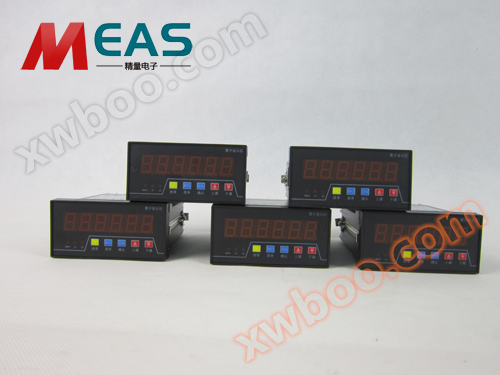
JL9648 Bitshift Display Guide
JL9648 ye tɛ̈n ye tɛ̈n ye tɛ̈n ye tɛ̈n ye tɛ̈n ye tɛ̈n ye tɛ̈n ye tɛ̈n ye tɛ̈n ye tɛ̈n ye tɛ̈n ye tɛ̈n ye tɛ̈n ye tɛ̈n ye tɛ̈n ye tɛ̈n ye tɛ̈n ye tɛ̈n
Detalji proizvoda
JL9648Display of displacement is a high precision displacement display instrument developed by Jinan Precision Electronic Technology Co., Ltd. The instrument can enter pulse signals orRS485Communication, lëu bï ya tɔ̈ɔ̈u në kë wɛ̈t raan220vVoltage wala24vVoltage,JL9648Display displacement number adopts international universal terminals, shape size and installation convenient, and has parameter password protection function, dual-way relay dual-way action, dual-way automatic reset and other functions. Display displacement number adopts international universal terminals, shape size and installation convenient, and has parameter password protection function, dual-way relay dual-way action, dual-way automatic reset and other functions.
A, displacement number display parameter description:
Kode Bayan Setup Range Default value
Pn-00 Dɛ̈ɛ̈r dɛ̈ɛ̈r dɛ̈ɛ̈r dɛ̈ɛ̈r dɛ̈ɛ̈r dɛ̈ɛ̈r dɛ̈ɛ̈r 0~5 2
Pn-01 Metode de calcul0-Road tökB 1-Road tökA、2-Dual Way 4x Frequency 0~2 Simulation dɛ yic
Pn-02 Count magnification, after linear calibration, you can set a proportion ratio. Ka tɛ̈n yenë kɔc cï gam, ka tɛ̈n yenë kɔc cï gam 0.000~9999.999 1.00000
Pn-03 Lower limit value, decimal point is defined by setting. Lower limit value, decimal point is defined by setting. Lower limit value, decimal point is defined by setting. 0~999999 3.0000
Pn-04 Top limit value, decimal point is defined by setting. Limit value, decimal point is defined by setting. Limit value, decimal point is defined by setting. Limit value, decimal point is defined by setting. 0~9999999 5.0000
Pn-05 485Setup Serial Port Portrate 0:9600 bps, 1:19200
2:38400Et cetera. 0~5 0
Pn-06 Luɔi fuu, 0~9999999 0
Pn-07 Parameters protect password, non-zero time parameters are protected by password. Parameters are protected by password. Parameters are protected by password. Parameters are protected by password. Parameters are protected by password.9999Password wɛrɛ 0000~9999 0000
Pn-08 Relay reset time unit ye seconds ye,0.0Wala ka gɛɛr. Note1Ye. 0.0-999999.9 0.0
Pn-09 Lɔ filter coefficient,0Walisa ka filter,9A ye kɔrɔ puɔth. 0~5 Wala
Pn-10 485Adres de wɛ̈t, tïŋ wɛ̈t ë wɛ̈t ë wɛ̈t ë wɛ̈t ë wɛ̈t ë wɛ̈t ë wɛ̈t. 00-99 01
Pn-11 Pn11=0<unk> Lower Limit Action and <unk> Upper Limit Action, no middle action <unk> Lower Limit Action and <unk> Upper Limit Action, no middle action <unk> Lower Limit Action and <unk> Upper Limit Action, no middle action Pn11=1≥ Lower Limit Action, ku ≥ Upper Limit Action.Pn08=0Time relay action judged based on set values
Pn08Wala0Waktu I.e. set reset time based on setup timetAutomatic reset,
Pn11=3When relay action as a two-way action, pressPn08Setting Time Dual-way Automatic Reset 0~2 0
Pn-12 Ajuiɛɛr de relay 0-99 2
Pn-13 Serial output content 0 <unk> Nyuɔ̈th kä 1-Kode ye raan 0-1 0
Pn-18 Nyuɔ̈thkɛ0: 1Shift
2Speed1Relay
3Kuen ye kɛ̈k (relay ye kɛ̈k ye kɛ̈k ye kɛ̈k ye kɛ̈k ye kɛ̈k ye kɛ̈k ye kɛ̈k ye)2Relay
4Kuen ye kɛ̈k (relay ye kɛ̈k ye kɛ̈k ye kɛ̈k ye kɛ̈k ye kɛ̈k ye kɛ̈k ye kɛ̈k ye)1Relay
5Lɔ̈k ye looi (relay ye looi në kaam de tɛɛr)2Relay Kä ye looi (relay ye looi në kaam de kaam de kaam de kaam de kaam de kaam de kaam de kaam de kaam de kaam de kaam de kaam de kaam de kaam de kaam de kaam de kaam de kaam) 0
0-5 PN-19

Modɛl SpeedWakt ye updateII.
JL9648 Display Wiring Definition: Nyuɔ Signal Supply raar Supply raar
Lɔ̈k raar Sensor Terminal dɔ +12v +5v GND Lekkin B A
B- 9 10 11 12 13 14 15 16
A- 1 2 3 4 5 6 7 8
Terminal ye nhial Terminal ye piny Terminal dɔ220VAC J2Relay dɔ J1 Relay dɔ
RXDTXD JL9648 Shift Number Display Meter Power Often OpenOften Open
定制r232 ye
1JL9648
1Parameters displacement display settings: Na cïn password ye gël)Tɛmɛ function key (MO(Yïn ka tɔ̈u ka tɔ̈u ka tɔ̈u ka tɔ̈u ka tɔ̈u ka tɔ̈u ka tɔ̈u ka tɔ̈u ka tɔ̈u)Pn-00
2; Go to parameter settings, you can use the ↑ ↓ key, loop display until you want to change the parameters; go to parameter settings, you can use the ↑ ↓ key, loop display until you want to change the parameters Pn-XX)Na window ye parameters nyuɔɔthPn-XXNa cï yɔ̈ɔ̈k, ka OK (
3En (Go to the parameter setting state, the main window displays the parameter end bit as a flashing state; Go to the parameter setting state, the main window displays the parameter end bit as a flashing state; Go to the parameter setting state, the main window displays the parameter end bit as a flashing state;)Ba wɛ̈t ye yɛlɛma, tɛmɛ wɛ̈t ye yɛlɛma ye yɛlɛma ye yɛlɛma ye yɛlɛma ye yɛlɛma ye yɛlɛma ye yɛlɛma ye yɛlɛma ye yɛlɛmaMO(Lɔ̈k) Lɔ̈k ye rot ye rot ye rot ye rot ye rot ye rot ye rot ye rot ye rot ye rot ye rot ye rot ye rot ye rot ye rot ye rot ye rot ye rot ye rot ye rot ye rot ye rot ye rot ↑ ↓ key to change the value, after setting the good parameters, press the OK key (En(Jump out on parameters)
4Pn0XX tɛmɛ,)Press (
5MO (Lëk tɛ̈n tɛ̈n tɛ̈n tɛ̈n tɛ̈n tɛ̈n tɛ̈n tɛ̈n tɛ̈n))Na yɔ̈ɔ̈r ye yɔ̈ɔ̈r ye yɔ̈ɔ̈r ye yɔ̈ɔ̈r ye yɔ̈ɔ̈r ye yɔ̈ɔ̈r ye yɔ̈ɔ̈r
2CL.
A ka tɔ̈u ka tɔ̈u ka tɔ̈u ka tɔ̈u ka tɔ̈u ka tɔ̈u ka tɔ̈u ka tɔ̈u ka tɔ̈u ka tɔ̈u ka tɔ̈u ka tɔ̈u ka tɔ̈u ka tɔ̈u ka tɔ̈u ka tɔ̈u ka tɔ̈ A lëu bï ya luui në kë de parameters ye tïŋ.Na ye password ye gëlNa yɔ̈ɔ̈r ye yɔ̈ɔ̈r ye yɔ̈ɔ̈r ye yɔ̈ɔ̈r ye yɔ̈ɔ̈r ye yɔ̈ɔ̈r ye yɔ̈ɔ̈r ye yɔ̈ɔ̈r0000Pn-CO.", ka tɛmɛ password. Window nyuɔthBit ye tɔ̈u piny, ye tɛ̈n ye tɛ̈n ye tɛ̈n ye tɛ̈n ye tɛ̈n ye tɛ̈n ye tɛ̈n ye tɛ̈n ye tɛ̈nMO(Lɔ̈k wɛ̈t dɔ̈ɔ̈ŋ ye tɛ̈n ye tɛ̈n ye tɛ̈n ye tɛ̈n ye tɛ̈n ye tɛ̈n ye)En(Confirm that the program is entering the parameter setting state) Tɛm tɛm tɛm tɛm tɛm tɛm tɛm tɛm tɛm tɛm tɛm tɛm tɛm tɛm tɛm tɛm tɛm. Na yïn ye wɛ̈t cïï gɔ̈ɔ̈r wala yïn ye wɛ̈t cïï gɔ̈ɔ̈r (
CL.Pɛ̈i, program lɛ̈k tɛ̈n yenë yen luui.A tãŋuan,
1. JL9648Kalibration function of displacement displayLɔ̈k function key në mode normal (MO)+(1EN(Ye tɛ̈n ye tɛ̈n ye tɛ̈n ye tɛ̈n ye tɛ̈n ye tɛ̈n ye tɛ̈n ye)Ka tɛmɛ sekond, window ye nyuɔɔth 0000C-00004(Ka tɛ̈n yen, ka tɛ̈n yen ka tɛ̈n yen ka tɛ̈n yen ka tɛ̈n yen ka tɛ̈n yen ka tɛ̈n yen ka tɛ̈n yen)1111Would be anyBits, password defaultWala lëu yɛlɛma, yɛlɛma wɛ̈ɛ̈r ku wɛ̈ɛ̈r ku wɛ̈ɛ̈r ku wɛ̈ɛ̈r ku wɛ̈ɛ̈r (1111MO(Move the blinking bit and enter the correct password)Lɔ̈k OK (En(Go to calibration, window displays)0Cn--0"Nyuɔ̈th""And blink (if not blinking, press theEN1 ye), lamba kënë ye kalibration point, a lëu bï ya waar në ↑ ↓ key, a range of adjustment is2-9Lɔ̈k OK (1En ) Lɔ kalibrasiɔn (ni kalibrasiɔn point yeka kalibre)Nyuɔ̈th Window"Cn--1"Lɛ̈k6EN0Wakt tök, window ye nyuɔɔtha ""Ku bit ye tɔ̈ɔ̈u ye tɔ̈ɔ̈u ye tɔ̈ɔ̈u ye tɔ̈ɔ̈u ye tɔ̈ɔ̈u ye tɔ̈ɔ̈u ye tɔ̈ɔ̈u ye tɔ̈ɔ̈u ye tɔ̈ɔ̈uEnWindow ye nyuɔɔth ka tɛmɛ "Cn-2"Lɛ̈kENNa cï yïn gam, ke yï lɔ̈ɔ̈m ka tɛ̈n yenë yen tɛ̈n yenë yen tɛ̈n yenë yen tɛ̈n yenë yen tɛ̈n yenë yen tɛ̈n yenë yen tɛ̈n yenë yen tɛ̈ En(Go to next point calibration)Nyuɔ̈th Window"Cn--3<unk> Lɔ̈k (En)Ka tɛmɛ ka tɛmɛ ka tɛmɛ ka tɛmɛ ka tɛmɛ ka tɛmɛ ka tɛmɛ ka tɛmɛ ka tɛmɛ ka tɛmɛ ka tɛmɛ ka tɛmɛEn
2. (Save the calibration parameters and exit, returning to normal condition) (Save the calibration parameters and exit, returning to normal condition) (Save the calibration parameters and exit, returning to normal condition.) Na kalibrasiɔn ka tɛmɛ, tik Zero key (
CL.
(To cancel the previous calibration value, please do it carefully!) (To cancel the previous calibration value, please do it carefully!) (To cancel the previous calibration value, please do it carefully!) (To cancel the previous calibration value, please do it carefully!)Ka tɛ̈n ye password ye gël, ka tɛ̈n ye parameter ye tɔ̈u nhialFunksiɔn PeakTɛ̈n tɛ̈n yen tɛ̈n yen tɛ̈n yen tɛ̈n yen tɛ̈n yen tɛ̈n yen tɛ̈n yen tɛ̈n yen tɛEn(Lɛ̈k ye ↑MAX-PLampu ye nyuɔɔth,PVWindow ye tɛ̈n ye tɛ̈n ye tɛ̈n ye tɛ̈n ye tɛ̈n ye tɛ̈n ye tɛ̈n ye tɛ̈n ye tɛ̈ Lɔ̈k OK (En
(Lɛ̈k ↑ button,
MAX-P5Lampu ye tɛ̈n ye tɛ̈n ye tɛ̈n ye tɛ̈n ye tɛ̈n ye tɛ̈n ye tɛ̈n ye tɛ̈n ye tɛ̈n.
Онлайн разпит
-
Kontakti
-
Kompanija
-
Telefon
-
E-mail
-
WeChat
-
Kod provjere
-
Сједност поруки
-